


It’s 2026. If you’re still relying only on manual statement uploads, it might be time to take a closer look at Commspace DataFeeds – and how much time (and sanity) they can save you.
What Are DataFeeds?
A DataFeed is a direct, automated data connection between Commspace and your product providers. No statements to request. No files to import. Your data flows in on its own – giving you a real-time, aggregated view of all your products across providers.
Less admin. More accuracy. A clearer picture of your business.
Why It Matters
- No more chasing statements – Your data lands in Commspace as soon as it’s available from the provider.
- Accurate insights – Data is sourced directly from providers, so what you see reflects reality – not manual adjustments.
- Time back in your day – Automating the flow of information means your team can focus on analysis, not admin.
Providers Already on Board
We’re continuously adding new feeds as more providers come onboard. Every new connection gives you a more complete, accurate picture of your revenue streams and client coverage.
Want to see which providers are already ahead of the curve? 👉 Check out our Integrations page to see the forward-thinking providers already sending DataFeeds directly to Commspace.
If someone you work with isn’t listed yet, let us know. We’ll get the conversation started.
How to See What’s Available
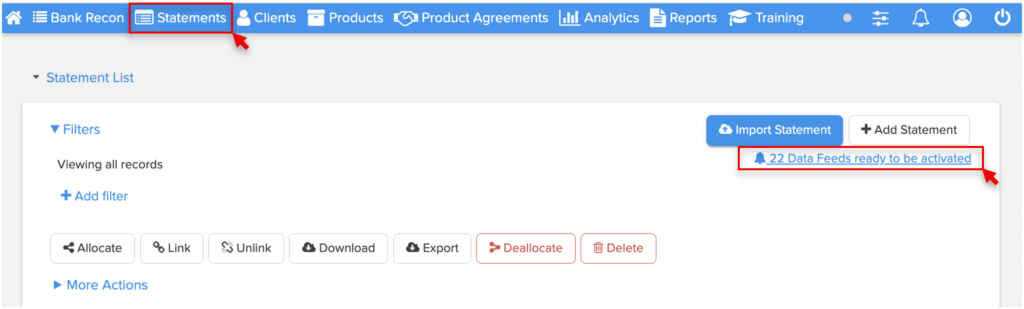
If you’re an existing Commspace client, go to your Statement Import page in Commspace. You’ll see any feeds that aren’t activated for your practice yet. Activating takes a few clicks – and once it’s running, the data keeps flowing automatically.
The Bottom Line
DataFeeds quietly transform how you work. They cut the admin, fix the data accuracy problem, and give you a complete picture – without you lifting a finger after setup. If you haven’t activated yours yet, now’s a good time to check what’s waiting for you.
Want to know more? Read more about how it works here.

